
GitHub Project Reports
What Does It Do?
The Metadata tool can connect securely to your public or private GitHub repositories and return the list of files commit, when they were commit and by whom.
What Do You Need?
-
A public or private GitHub Organisational Level Project.
Guide
-
Open Microsoft Excel.
-
Navigate to the Metadata ribbon.
-
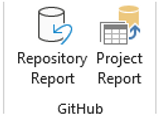
Locate the GitHub section of the ribbon.
-
Click the Project Report button in the Programming section.
-
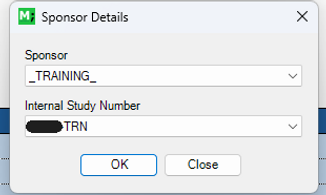
A file dialogue window will appear.

-
Select the applicable Sponsor and Study Number.
-
Then click OK to continue.
-
The process will begin and a progress bar will appear indicating the status of the process.

-
After some time the GitHub Project Report will appear.

-
The report itself contains all items present in the study's project, including the item name, corresponding output name, scope, component, assignee, validation assignee, and status.
-
The user can export this report to Microsoft Excel by clicking the Export Report button if required.